Your program’s entire schedule in one central place
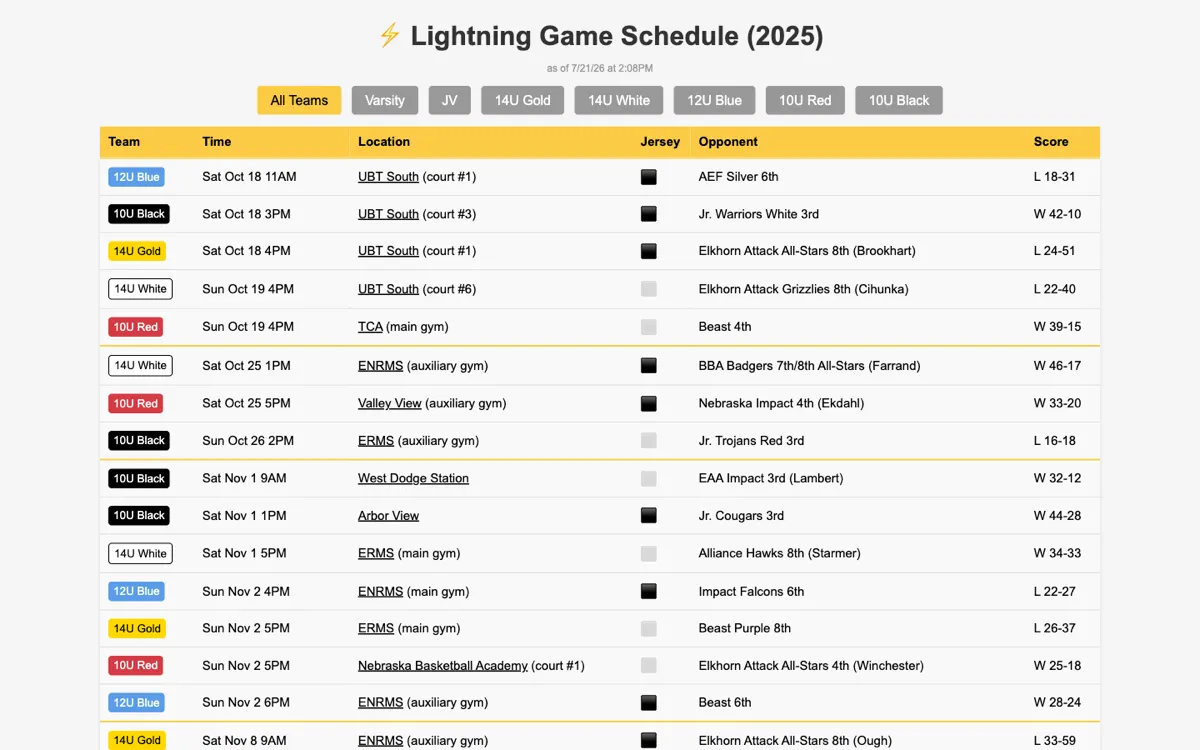
Stop sharing spreadsheets and forwarding emails. Simply put every team, every game, every practice, and every location on one page for everyone to see.
Free to try — no credit card to sign up.
Features
We have you covered
Team Time helps bring your sports program together by providing one place to see what’s happening.
Get Started- Unified interface
- Easy data entry
- Unlimited games
- Practice schedules
- Keeps season records
- Invite multiple managers
- Syncs from Tourney Machine
- Works with calendar apps
- No apps to install
- No accounts to create
Testimonials
People are talking
Loved by parents, coaches, and Athletic Directors, too.
"As a coach, having one less thing to worry about communicating to my players and families has saved me so much time & effort!"
 LM
LMLisa McGee
Varsity Head Coach, Warriors Volleyball
"I knew having all our game info centralized would be a big time saver. What I didn’t realize was how much it would help pack the stands!"
 JM
JMJeff Malone
Athletic Director, Lightning Basketball
"This has been a game changer for me! Now our program has all the important information in one easy place. It’s made my job so much easier!"
 EE
EEErica Eikmeier
Schedule Coordinator, Warriors Volleyball
Per team
Every team over 5 is FREE$99/season
Everything is free until you publish — no credit card required to sign up.
Get Started- Unlimited teams, games, practices, and events
- Unlimited managers with role-based access
- Free access to the schedule and calendar sync
- Game results, team records, and season archive
- Sync games from Tourney Machine for easy management
FAQ
Frequently Asked Questions
$99 per team, per season. Only your first five teams are billable, so a season’s fees are capped at $495 no matter how many teams you run — team six and beyond are free.
We currently support Basketball, Volleyball, Football, Soccer, Baseball, and Hockey. If you want to use it with a sport not on our list, please let us know!
It becomes a permanent archive — scores, records, and all — and stays linked from your Team Time page while you start the next season fresh.
No. Your schedule is a public web page. Parents open a link. That’s it. Nothing to install, nothing to sign up for, no password to forget.
The schedule lives on {your_program}.teamtimehq.com. You can link to that page from your website. For those who want more, there is a one-time Custom Branding upgrade which lets you host it on your own website as a subdomain.
Yes. Add a practice once — or repeat it weekly through a date — and it appears in a practice schedule on your public page. Games stay front and center for fans; players and parents tap “Show Practices” to see the rest. Practices can apply to the whole program or just the teams you pick.
Team Time was created to help our homeschool basketball program. We found it super useful, so we set it up for our homeschool volleyball program, too. We homeschool all of our kids. Programs like Lightning and Warriors have been a huge blessing in our lives. Hopefully this discount makes Team Time affordable for our fellow homescoolers!
After signing up (but before paying), email jerod@reallysimple.systems. It’s a manual discount we apply to your account, not something the checkout page offers on its own,
Yes. Every schedule — the whole program or a single team — publishes a calendar feed that Apple Calendar, Google Calendar, and Outlook can subscribe to. There are two flavors: games only, or the full schedule with practices included. When you change a game time, their calendar updates.
As many people as you need. No extra cost. Owners and admins manage the whole program; managers see and edit only their assigned teams’ games.
No. Paste your Tourney Machine link and Team Time pulls the schedule in and keeps it current, checking hourly. Add games by hand alongside synced ones; synced games stay read-only so a re-sync never clobbers your edits.
Still have questions?
Email us